My AI Development Workflow
I’m a product designer who has always prototyped in code, and lately I’ve been building my own apps with AI coding agents. This is the setup I landed on after a lot of trial and error — agents do the work on an always-on Mac mini, I steer from my laptop or phone, and nothing ships until I’ve looked at a preview and merged it. It’s written so you can copy it, with prompts you can paste and placeholders like <host> and <repo> where your own names go. The tools change every few months and this page will change with them, so check the date at the top to see how current it is.
How it fits together
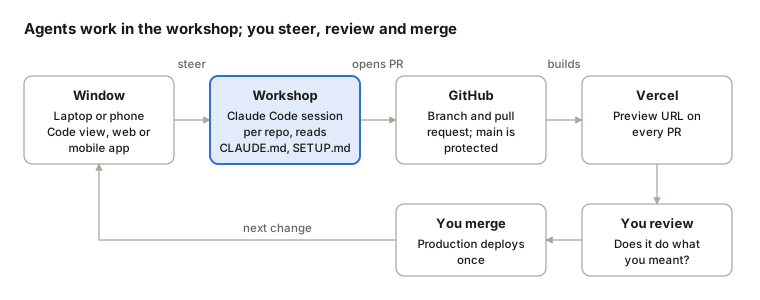
The workshop is an always-on machine that holds the code, the logins and one Claude Code session per project. Laptops and phones are only windows into those sessions, so closing one stops nothing. The agent opens a pull request, Vercel builds a preview, and you review it and merge.
Principles
- Separate the window from the workshop. Agents run where the code and the logins live, and people steer from any device.
- Guardrails belong in the system, not the prompt. Instruction files guide the agent, but branch protection is what actually enforces the rules.
- Review happens in layers. Automated checks catch most code problems, engineers review code on a team, and the person directing the work reviews the preview.
- Verify everything, including what the agent reports. Read settings back after changing them.
- If you’re the clipboard, rewire. When you find yourself copying text between two tools, talk to the agent that can see the system instead.
- Keep the context where the work happens. Each repo keeps a decision log the agent reads and updates, so it can decide what it can and ask only about what’s yours.
- Instructions are layered and should shrink. Each rule says why it exists, so it can be deleted when it stops being needed.
- Logins are design decisions. How an agent signs in decides who pays and what it can reach.
- Design to be replaced. The tools change monthly, but the principles and the playbook last.
The pieces
| Piece | Where it runs | What it does |
|---|---|---|
Workshop (<host>) |
An always-on Mac mini, headless, on a private network | Holds the code, the logins and every agent session |
| Coding agent (Claude Code) | A terminal window on the host’s desktop, signed in to a subscription | Reads code, runs builds and tests, commits, opens PRs |
| Remote Control | On for every session | Makes each host session reachable from another device |
| Launcher | A script in the host’s login items | Starts one session per project at login and resumes its last conversation |
| Windows | Claude desktop app (Code view) on a laptop, claude.ai/code, or the mobile app | Where you chat with sessions, review and steer |
| Regular chat | Claude desktop or web, Chat view | Thinking, writing and research that isn’t development |
| GitHub | Cloud | Source of truth; main protected for everyone, admins included |
| Vercel (web apps) | Cloud | A preview URL on every PR and a production deploy on merge |
| Simulator / TestFlight (Apple apps) | Host / cloud | The preview for iOS and watchOS work |
| Tailscale | Every device | Private network for screen sharing and SSH into the host |
Set up the workshop
This is a one-time setup of the always-on machine. Do steps 1 to 3 at the host’s own desktop (screen sharing over Tailscale works), not over SSH.
1. Make it a reliable headless machine
- Turn auto-login on and automatic OS updates off, so it comes back unattended after a restart.
- Never sleep, and restart after a power failure:
sudo pmset -a sleep 0 disksleep 0 autorestart 1. - Add an HDMI dummy plug, so the OS sees a display and screen sharing works at a normal resolution.
- Decide deliberately about the lock screen and disk encryption. Turning them off trades physical security for unattended operation, which is only reasonable if the machine is somewhere private.
- Allow screen sharing and SSH only over the private network.
2. GitHub login
gh auth login -h github.com -p https -wEnter the one-time code at github.com/login/device on any device, approve it, then press Enter in the terminal (gh only checks for approval after Enter). Over SSH the keychain is usually locked, so gh saves the login to a file instead. Restrict it with chmod 600 ~/.config/gh/hosts.yml, then run gh auth setup-git.
3. Agent login
Sign in to Claude Code from the host’s desktop. On macOS the subscription login lives in the keychain, which stays locked in an SSH session, so over SSH the agent can’t see it and may fall back to API billing. Confirm the header shows your subscription plan. Never put an Anthropic API key in the shell.
4. One session per project, started at login
In Claude Code, run /config and set Enable Remote Control for all sessions to true. Then save a launcher like this as ~/agents/start-claude.command, make it executable, and add it in System Settings → General → Login Items:
#!/bin/zsh -l
projects=(<repo-a> <repo-b> <repo-c>)
run='claude --continue || claude'   # fresh session if there's nothing to continue
for p in ${projects[2,-1]}; do
  osascript -e "tell application \"Terminal\" to do script \"cd ~/Developer/$p && $run\""
done
cd ~/Developer/${projects[1]} && eval "$run"
Name each session after its project (/rename <repo>), then test with a real restart. Within a few minutes every session should be back with its conversation intact.
5. Global instructions and the project-setup skill
Write the global instruction file and the project-setup skill described in the next section. They’re what make every later session follow the same rules without being told.
Instructions and guardrails
Every session reads its instructions when it starts, broadest layer first. The text layers guide the agent, and branch protection on GitHub is the layer that actually enforces anything.
| Layer | Applies to | Holds |
|---|---|---|
Global instructions (~/.claude/CLAUDE.md) |
Every session, every repo on the host | How you work, machine facts, git, secrets and context rules |
Project instructions (CLAUDE.md) |
That repo | Stack, commands, every pre-commit check, project-specific rules |
Decision log (docs/SETUP.md) |
That repo | Decisions and why, current state, open items, next steps |
Permission rules (.claude/settings.json) |
That repo | Hard denies such as pushing to main, including with flags like --force (a backstop, not a security boundary) |
| Branch protection | Everyone, admins included | The real enforcement: PR required, no force-push or deletion |
| The request | That task | One-off instructions |
The global file loads when a session starts, so an edit applies to new sessions and to old ones after a restart or /clear.
The global instruction file
Keep it short. Each rule should say why it exists, so you can tell when it’s safe to delete. An outline that works:
## Who and how
- Be direct and recommend one option. Never guess. Short reports: what changed, what's left, what you need.

## This machine
- The agent uses the subscription login. Never add an API key to the shell; app keys live only in a project's .env.local.
- Pushes use my GitHub account, so branch protection must enforce for admins.

## Git and shipping
- Never commit or push to main. Branch, open a PR, give me the preview link. I merge.
- Run the project's build and tests before every commit.
- "Merged" means merged into main (check `git branch --merged main`). Never delete a local-only branch.

## Secrets and safety
- Never print or commit secret values. Ask before anything hard to undo.

## Context and questions
- Every repo keeps a decision log at docs/SETUP.md. Read it before setup, infra or planning work, and update it in the same commit as the work.
- When the answer is in SETUP.md or is standard practice, make the call and tell me what you chose and why.
- Ask me only about accounts, money, anything users will see and irreversible actions, as a recommendation plus a yes/no.
- Walk me through manual steps (browser, dashboards) one at a time and wait for "done."

## New repos
- Use the project-setup skill.
The decision log
docs/SETUP.md is what keeps you from becoming the clipboard. Without it, the context for a project lives in whichever chat you planned it in, and the agent doing the work has to ask you for it. Four sections are enough:
# <repo> setup and decisions

## Decisions
- <decision> — <why>

## Current state
- <what's done and where it lives; no secret values>

## Open items
- <what's left before it can go public>

## Next steps
1. <the next thing to do>
The project-setup skill
A skill at ~/.claude/skills/project-setup/ holds the new-repo checklist (next section), templates for CLAUDE.md, settings.json and SETUP.md, and a script that turns on branch protection and reads it back. Running it counts as approval for the repo settings it lists, for that repo only.
Start a new project
Plan and write the spec in a regular chat, where research, memory and back-and-forth are easiest. When the idea is settled, hand off once: the chat writes a kickoff prompt that carries the spec, and from then on the project lives in Code. If the scope changes later, rethink it in the Code session rather than drifting back to the chat, or do a deliberate second handoff.
When the spec is ready, ask the chat:
The spec is settled. Write a kickoff prompt for a new Claude Code session that will build this. Include the spec itself (what it is, who it's for, decisions and why, open questions, first milestone), tell the session to use the project-setup skill and save the spec as docs/SETUP.md, and leave out secret values. Plain text in a code block so I can paste it.Then create the empty GitHub repo yourself (private by default), because naming and visibility stay a human decision. Clone it into ~/Developer on the host, start a session for it in Terminal (cd ~/Developer/<repo> && claude), and paste the kickoff. It should read roughly like this:
Let's start a new project: [one or two sentences on what it is and who it's for].

The spec from my planning chat is below. Use the project-setup skill:
1. Save the spec as docs/SETUP.md (decisions and why, current state, open items, next steps). Ask me only about gaps the spec doesn't cover, as recommendations I can answer yes or no.
2. Write CLAUDE.md, then show me both files.
3. Walk me through the rest of the checklist one step at a time. Update SETUP.md as each step finishes.

--- spec ---
[the spec]
If there’s nothing to research and the idea is small, you can skip the chat and start with that prompt in Code, letting the session interview you to fill in SETUP.md.
The checklist the skill walks through:
- Get the build and tests passing on the host.
- On a branch with a PR:
CLAUDE.md,docs/SETUP.mdand permission rules that deny pushing tomain. - Protect
mainon GitHub: require a PR, block force-push and deletion, enforce for admins, and require CI checks if the repo has any. Read the settings back. - Auto-delete merged branches.
- Web apps: exactly one Vercel project connected to the repo, with previews on for every branch. Confirm the setup PR actually gets a preview.
- Apple apps: confirm simulator builds for each scheme and set up TestFlight for device testing. Decide the bundle ID before the first upload, because it’s permanent.
- Add the project to the launcher so it survives restarts, and
/renamethe session.
The first push that creates main is done by you, since the agent’s own rules block pushes to main. A new session started from the Code view’s “New session” button runs in the cloud, not on the host, which is why new projects start in Terminal or from the launcher.
Bring in an existing project
An existing repo goes through the same checklist as a new one. Run the project-setup skill in a session for that repo, and it skips what’s already done. Two situations need extra steps.
Its context lives in a chat
If you’ve been planning a project in a regular chat, the Code session doing the work won’t know what you decided. It will ask, you won’t know either, and you’ll end up carrying messages back and forth. Move the context once.
In the chat that holds the context:
Write a handoff for the Code session that's taking over this project. Include decisions made and why, current state, open items, and next steps. No secret values. Plain text in a code block so I can paste it.Then in the project’s Code session:
Context for this project has been living in a separate chat. I'm moving it here so I stop copying between the two. Below is its handoff.

1. Save it as docs/SETUP.md on the current branch, using the template from the project-setup skill. Leave out secret values.
2. If this repo's CLAUDE.md doesn't already point to docs/SETUP.md, add one line that does.
3. Commit both and show me the diff. Don't push to main.

--- handoff ---
[paste the handoff here]
If the context is only in a long Code conversation, the second step is just “Write what we’ve decided so far into docs/SETUP.md using the project-setup template, then commit it.”
It’s on another machine
For projects where only one machine may touch a shared dev database at a time:
- Old machine: push every branch, stop dev servers, and rename the env file so it can’t reach the database.
- Compare secrets without revealing them: fingerprint the env file minus short-lived tokens on both machines (
grep -v '^<TOKEN_NAME>' .env.local | shasum) and compare only the hashes. - New machine: pull, reinstall, refresh only the short-lived token, build, confirm which database it points at, then run a full baseline check before any new work.
- In-flight branches: rebase onto
mainand push with--force-with-lease. - Delete the old machine’s secrets once the baseline passes. Laptops leave the house, but the host doesn’t.
The daily loop
- Open the Code view in the Claude desktop app (or claude.ai/code, or the mobile app) and pick the project’s session.
- Describe the change in plain words. The agent branches, builds, tests, commits and opens a PR.
- Answer its questions there. If it asks something you can’t answer, the missing piece belongs in
docs/SETUP.md, so add it rather than going to another chat for the answer. - Check the preview linked on the PR (or the simulator build for Apple apps). This is the review that’s yours: does it do what you meant?
- Merge it yourself. Production deploys once.
- Ask the agent to switch to
main, pull and delete merged branches.
Close the laptop any time, because the session keeps working on the host. If it stops to ask permission, it waits for you. Restart the host about once a week to pick up Claude Code updates, and the launcher brings every session back.
Who does what: development happens in the host’s Code sessions, and regular chat is for thinking, writing and research. If you notice yourself copying prompts from one to the other, the planning has drifted into the wrong place.
Patterns
An app that calls a model API
The coding agent and the app you’re building should never share a login. The agent uses your subscription, and the app gets its own API key with its own budget.
- One workspace per app in the Claude Console, with a monthly spend limit, so a bug or abuse can’t run up an open-ended bill.
- Create the key inside that workspace and confirm it landed there. A test call returns the workspace ID in the
anthropic-workspace-idresponse header, which you can compare with the Console. - Keys live only in the project’s
.env.local(chmod 600, gitignored), never in the shell, a chat or a commit. When the agent copies values to the host, it pipes them from the file (for example intovercel env add) so nothing is printed. - Mark them sensitive in Vercel when local runs read from
.env.localand never need to pull them back. - Before going public, use a key that isn’t tied to your personal account, give dev its own database branch, and add an in-app daily dollar cap.
A bot that must push to a protected main
Some repos have a workflow that commits to main after each merge (a changelog, for example), which branch protection would block. This pattern was tested in a throwaway repo first:
- A write deploy key, with its private half stored only as a secret in a GitHub Actions environment restricted to
main. Workflows on PR branches can’t read it. - Ruleset 1 on
main: PR required, required CI check, applies to admins, with the deploy key as the only bypass. - Ruleset 2 on
main: no force-push and no deletion, with no bypass for anyone. It’s kept separate because a bypass covers every rule in its ruleset. - Skip CI for the bot’s commits with
paths-ignoreon the push trigger, not a[skip ci]message, because the hosting provider may also honor that marker and skip the deploy the bot’s commit is meant to trigger. - Turn the rulesets on only after the workflow change is merged and the first bot push through the key has worked.
Keeping instructions current
- When a rule stops earning its place, delete it. Rules that say why they exist make this easy.
- When the agent asks something you can’t answer, or you find yourself repeating an instruction, that’s a gap in
SETUP.mdorCLAUDE.md. Fix the file, not the conversation. - Disable plugins and tool servers you don’t use, because every loaded tool costs context in every session.
- Start a fresh session after big changes. The instruction files and the decision log carry the context, so old conversations aren’t needed.
Design workflows
Design plugs into the same loop. A design becomes a request to the project’s Code session, and the PR preview is where you judge whether the build matches it. There are three ways to work, depending on who designs:
| Approach | Who designs | Best for | Watch out for |
|---|---|---|---|
| Figma first, Claude builds | You, in Figma | Polished, precise screens | You’re the bottleneck for every screen |
| Claude designs in Figma | Claude, using your library | Fast first drafts that stay editable | Quality depends on how good the library is |
| Code first, then Figma | Claude, in code or Claude Design | Exploring ideas with real interaction | Less pixel control, and it can drift from the system |
My default is to keep the design system in Figma as the source of truth, explore quickly in code, polish key screens in Figma, then build through the Code session. What makes any of these work is a design system an agent can read: tokens in code, components mapped to Figma with Code Connect, and written guidance on when to use what.
Lessons learned
| What happened | Lesson |
|---|---|
| The copying came back while setting up a new app | Planning in a chat while a Code session did the work split the context. Moving decisions into docs/SETUP.md fixed it, not a new tool. |
| Agent over SSH showed “not logged in, API billing” | The keychain is locked over SSH, so sign in and run sessions from the host’s desktop. There was no API key, so no surprise bill. |
| Branch protection didn’t apply to the agent | The agent pushes as you, so protection has to enforce for admins. |
| A setting reported “on” wasn’t | Always read settings back after changing them. |
| PR previews had silently been off for weeks, and every deploy built twice | A config rule blocked branch builds, and a stray second hosting project was connected. Check that a PR actually gets one preview. |
A deny rule missed git push origin main --force |
Permission rules match text, so cover the variants with flags. Branch protection is the backstop that caught it. |
A first push to main was blocked by the agent’s own rule |
Correct behavior: a person does first pushes. |
| The agent skipped unit tests and a preview failed | Project instruction files list every pre-commit check, not just the build. |
| Two PRs “touching different files” conflicted | Docs and logs collide. Resolve them and rerun only what changed. |
git branch -d deleted an unmerged branch whose remote copy matched |
“Merged” means merged into main. Check git branch --merged main. |
| Resuming a months-old conversation hung | Start fresh after big changes. The files carry the context. |
| Duplicate tool servers from plugins | Disable what you don’t use, because every loaded tool costs context. |
Troubleshooting
| Problem | Fix |
|---|---|
| A project’s session is offline | Screen share into the host and check its Terminal window for a prompt (runtime install, folder trust). Restart it with cd ~/Developer/<repo> && claude --continue. |
| The header shows API billing | You’re in SSH or signed out. Use the host’s desktop and sign in with the subscription. |
| A new session isn’t on the host | Sessions started from the Code view’s New session button run in the cloud. Start host sessions in Terminal or from the launcher. |
| The PR has no preview | Check the repo’s hosting config and that exactly one project is connected. |
Push to main refused |
Working as intended. Branch and open a PR. |
| A session sits idle mid-task | It’s probably waiting for approval. |
| The agent keeps asking things you can’t answer | The answer is missing from docs/SETUP.md. Get it once and add it there. |