A Claude guide for designers and PMs
A guide that got non-technical designers and PMs set up and working with Claude, now linked from the company's official AI onboarding docs.
In brief
- The problem
- Claude Desktop was a wide-open box. Most designers and PMs didn't know what to use it for, and those who did often didn't know how to start or had tried and given up. The company's official AI onboarding guides were geared toward engineering teams, with no path written for people who don't code.
- What changed
- Netflix's AI onboarding team linked to it from their official docs, and designers and PMs told me it was the easiest guide to follow. It also brought requests for help, requests to build tools for other teams, and office hours I volunteered to run.
- My part
- On my own initiative, I wrote the content and designed the site, and launched it when the design team got access to Claude Desktop. I used Claude Code to build the first version, then rewrote most of the design and copy myself over about a week.
Keep reading for the full story, or skip to the next case study, One design system, not two →
The full story
Most of my team had only used Claude as a chat box
In the summer of 2026, Netflix was rolling out Claude Desktop and Cowork to the company in stages. I had early access, so I’d already been using both for my own design and prototyping work and finding better ways to work with them. Most of the designers and PMs I worked with had only used Claude as a chat tool. Desktop could do much more: create files, connect to Gmail, Slack, and Figma, generate designs and prototypes, and write and run code. Getting there meant installing an app, signing in, connecting your tools, and then choosing among four products: Chat, Cowork, Design, and Code.
I’d been posting in Slack about how I was using these tools, and people started reaching out to me. Some wanted help getting started, and others asked me to build tools for them that they’d had trouble building with AI themselves. The company had official onboarding guides for AI tools, but they were geared toward engineering teams and didn’t have a path written for people who don’t code. So I started writing a guide on my own. I based it on how I’d explain to a coworker where to start, and on what I’d learned from using the tools myself. I launched it at the same time the design team got access to the tools.
The hardest part was knowing what to use it for
The most common problem I heard was that Claude was a wide-open box. Many people didn’t know what to use it for. Others knew they had problems AI could probably solve but didn’t know how to start, or had tried and given up.
For a while, the request I heard most was getting Claude to work with Figma files, and the gaps were large. Claude struggled with big files, so I told people to move only the frames they wanted help with onto a separate page, which cut down how much Claude had to search through. Many files also had frames that weren’t named or grouped, which made it hard to tell Claude where to look. I found workarounds, like using frame sizes to identify which frames to pull. I shared these tips with each person who reached out and was collecting what worked so I could add it to the guide.
So the guide had to answer the first question, which tool is for what, before anything else. It had to be complete enough to get someone from nothing installed to doing real work, and short enough that a busy designer would actually read it.
I organized the site around one loop of work
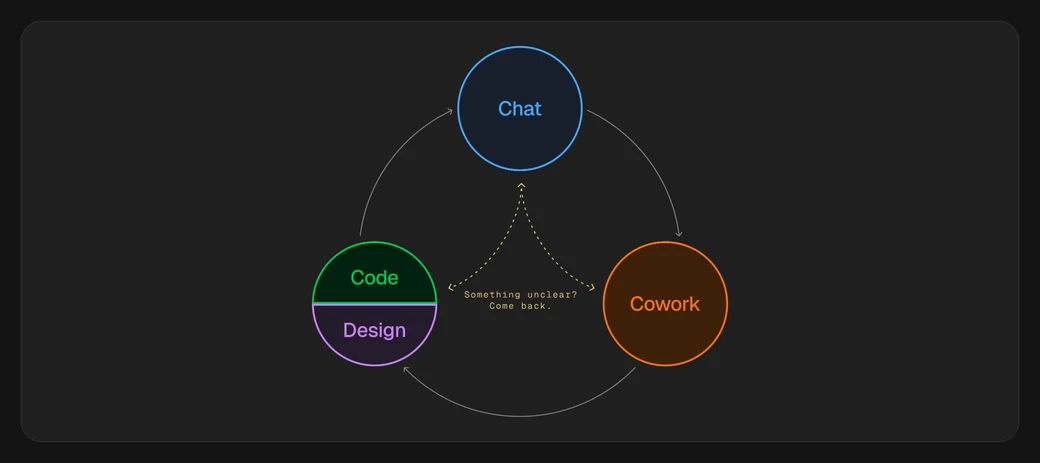
Instead of four separate product manuals, I built the guide around one idea: Chat thinks, Cowork acts, and Code and Design build. When something gets murky, you come back to Chat and clarify before moving on. Each product got a one-word job on the home page (Thinking, Doing, Designing, Coding) so people could pick a tool by what they were trying to do.
The Putting it Together page turns the loop into a working pattern. Start a Project in Chat for any ongoing work. Write global instructions once and project instructions per project, so you never repeat yourself. Keep a PROJECT.md file with status, decisions, and open questions. Use Chat to write the prompt before you hand a task to Cowork. When a conversation gets long, ask Claude to update PROJECT.md and start a fresh one.
Setup had to fit in five minutes
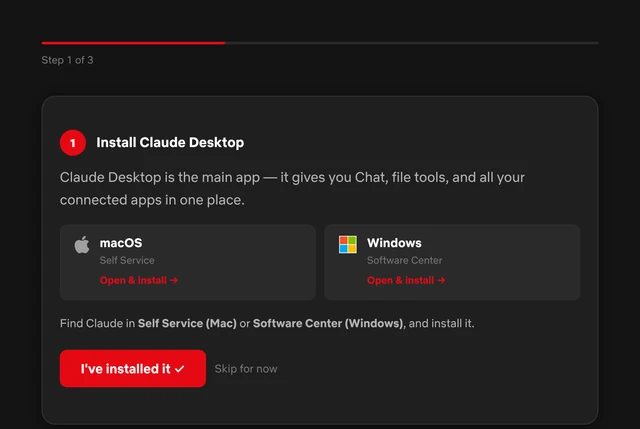
The site had to work for two kinds of visitors: people who still needed to install the app and get set up, and people who were set up and ready to learn how to work with the tools. The home page splits them right away, with a “Get started — 5 minutes” button for the first group and the four tool pages for the second. Setup is a short step-by-step flow, and the detailed guide picks up once it’s done.
I cut setup down to three steps: install the app, sign in, and connect your tools. A progress bar shows where you are, and every step can be marked done or skipped for later, so nobody gets stuck on one connector. I split connectors into recommended and optional so people weren’t faced with a long list of choices on day one. The last screen sends you to Chat first, since it’s the easiest place to start.
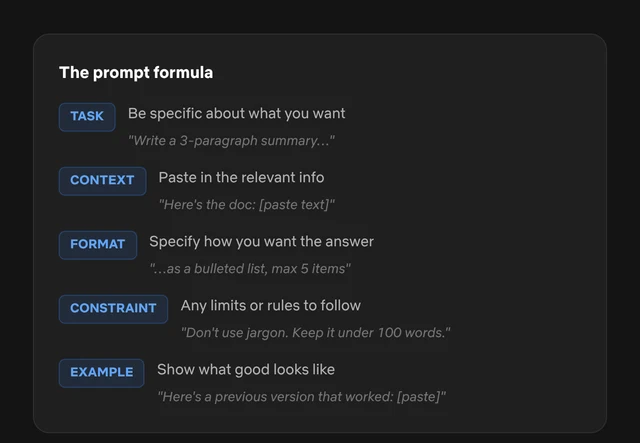
The rest of the guide teaches the habits that make results better. The Chat page breaks a good prompt into five parts (task, context, format, constraint, and example) and says up front that you don’t need all five. A section called “Three things Claude gets wrong” names the most common frustrations and gives a one-line fix for each. Every example prompt has a copy button, so people could paste it and change the brackets.
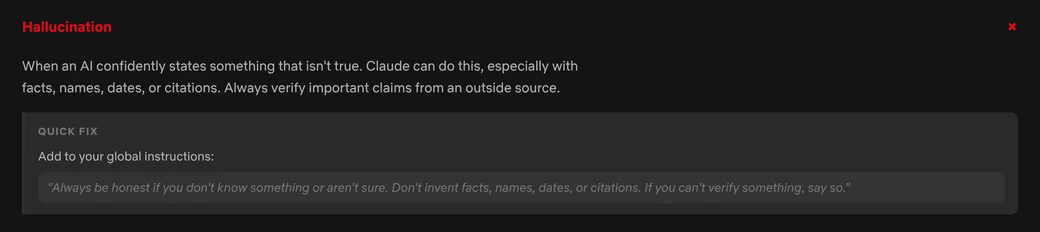
I also wrote a plain-language glossary for the words people hear in meetings, like context window, hallucination, and agentic AI. Where a term describes something that goes wrong, I added a quick fix under it, such as a line to add to your instructions so Claude says when it isn’t sure.
Most of my edits were cuts
Claude Code gave me a working first version on the first day. It had more of everything: labels on every card, buttons in every page header, a separate Tips page, sections of example combinations, and lots of sample prompts. Over the next week I removed most of it. On one day I cut the Tips page, two sections from Putting it Together, and the sample prompt cards on the Cowork page.
How I built it
The site is static HTML, CSS, and JavaScript with no framework, hosted on an internal platform. Claude Code did the building and most of the edits I asked for, across 218 commits, most of them in the first five working days.
I gave Claude a CLAUDE.md file with the site’s conventions, like an accent color per product and a button at the bottom of every page that leads to the next one. I also kept a PROGRESS.md as the single list of open work, with rules for how Claude should maintain it:
**When you complete a task:** Remove it from PROGRESS.md entirely.
Do not move it to a "completed" section.

If the session feels long, proactively tell the user and offer to
write a handoff prompt for starting a fresh session.
That handoff rule is the same pattern the guide teaches in Putting it Together. I was working the way I was asking my teammates to work.
The company’s AI onboarding team linked to it
I didn’t add analytics, so I don’t have usage numbers. Designers and PMs used it and told me it was much easier to follow than anything else they’d looked at. The clearest signal came from the team responsible for AI onboarding at Netflix: they linked to the guide from their official docs because it filled a gap they had for non-technical people.
The guide also changed what people came to me for. More people asked me for help, and I started getting requests to build tools for my team and other teams. I volunteered to hold open office hours, and a few designers came with questions.
If I did it again, I’d release the site in phases. I tried to anticipate too much up front, when I could have launched the setup guide first and added the detailed pages as I learned what people actually needed, the way I was already collecting the Figma tips. I’d also add basic analytics from the first day, so I could see which pages people used and where they stopped.
What’s changed since
Chat and Cowork have since been combined into one product, so much of what this guide explained, especially when to switch from one to the other, no longer applies. The loop still describes how I work: think it through, have Claude do the work, then build. The screenshots show the guide as it was in June 2026.