Permission Already Granted
AI assistants have gotten much better at figuring out which tool a task needs. Somewhere along the way, they also stopped asking before using my computer and my accounts. Those should have been two separate decisions.
The other day I opened Claude and noticed a message just above the text box. It said permission mode was set to Auto: Claude would work on its own and pause if anything looked unsafe, and that included using my connectors, Claude in Chrome, and apps on my computer, unless I turned them off.
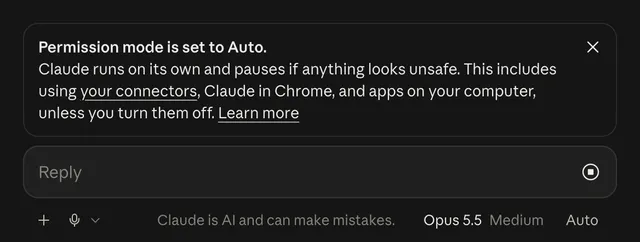
In other words, my connected accounts, my browser, and the apps on my Mac were already in scope. Claude wasn’t asking whether it could use them. It was telling me it already could, and pointing me to where I could turn that off.
I don’t think this was a careless decision, and I don’t think the people who built it are careless about safety. I think it’s the result of a change that was mostly right, taken one step too far.
The simplification was right
For about three years, AI products kept splitting their features into separate modes, tabs, and apps, each with its own place to start. What started as a single text box picked up a code interpreter, then projects, then artifacts, then canvas, then computer control, then standalone coding agents, then separate apps for long-running work and for design. Each one was a real capability. Together, they turned a conversation into a control panel. To use them well, you had to know which product your task belonged in before you’d finished describing it.
That put a lot of the burden on the person using it, and in 2026 both major AI labs acknowledged it. OpenAI reversed its multi-surface layout in July and put the message box back at the front.1 Anthropic folded Cowork back into Claude in September, explaining that people found it frustrating to figure out which product a task belonged in, and that work started in one place didn’t carry over to the other.2 OpenAI had already simplified ChatGPT’s model picker in June, cutting it down to a handful of options from Instant to Extra High.3
All of that is good. Which model runs, which tool gets used, whether code executes: those are implementation details, and I shouldn’t have to manage them. I want to hand the system whatever I’ve got, whether it’s a question, a file, or a voice memo, and let it figure out what it needs. If the request needs code, run code. I don’t need to see that decision being made.
Permission is different
There’s one thing I think should stay in front of me, and it isn’t a tool choice. It’s permission. If the system wants to use my computer, work in a code environment, or sign into one of my accounts, that should be my decision, made knowingly, at the moment it comes up. That isn’t friction to design away. It’s consent, and it’s the one part of the interface that’s working for me rather than for the product.
Think about giving a contractor a key to your house. You’d expect them to let themselves in and get to work without calling you about every outlet. You’d also expect them to ask before opening the filing cabinet in your office. Having the key doesn’t make everything behind every door fair game.
This wasn’t a setting I’d turned on. Auto is the default permission mode in Claude on the Pro, Max, and Team plans.4 Claude Code, Anthropic’s coding tool, made the same change on August 14, 2026.5 Instead of asking before each file edit, command, or network call, the session runs continuously while a separate classifier model checks each action. It blocks the ones that go beyond what you asked for, target infrastructure it doesn’t recognize as yours, or appear to be driven by malicious content in a file or web page. Almost everything else goes ahead, including pushes to your repository’s main branch.6 The engineering is impressive, but as a default, I think it’s the wrong call.
The reason comes down to what a wrong guess costs. If the system picks the wrong tool, I get a worse answer and ask again. That mistake is cheap, visible, and easy to undo. If it guesses wrong about access, something has already happened to my files, my accounts, or my computer, and I find out afterward. The first is a usability problem. The second is a trust problem. Treating both as “friction to reduce” is how a convenience quietly turns into a liability.
Why they did it anyway
The case for Auto is strong, and I’ve felt it myself. Approval fatigue is real. When a tool asks you to approve forty actions in a row, you stop reading around the fourth and start clicking Allow. By the tenth it’s a reflex. At that point the prompt isn’t protecting anyone. It just creates a record that says you consented. A classifier that quietly catches the genuinely dangerous actions probably prevents more real harm than a prompt everyone has learned to dismiss. I think that’s true, but it doesn’t lead where they took it.
If people are clicking through prompts without reading them, the problem is that the product asks too often and too vaguely, not that it asks at all. The fix is fewer, better questions. Save the interruption for the cases that really need it, and when you do ask, be specific enough that the question is worth reading. “Claude wants to push to main” is something I’ll actually read. “Allow tool use?” for the fortieth time isn’t. That’s a hard design problem, and solving it takes more work than turning the prompts off.
Removing the prompts costs something else, too. For most people, those prompts were the only view into what the system was actually doing. Without them, it becomes opaque. Not malicious, just hard to see. You find out what it did by looking at the results. For a tool people trust with more and more real work, “you’ll see afterward” is a strange place to end up.
What I’d want instead
Keep the simplification. Keep the automatic routing, the model selection, and the decisions about which tools a request needs. None of that was ever something I needed to manage.
Then, when the system needs access to something of mine that it doesn’t already have, ask me. Once, at the moment it needs it, naming the specific thing and the reason. Not a checklist during setup, which just brings back the old problem of making me predict what I’ll need in advance. And not a banner telling me about a decision that’s already been made.
Keep the classifier, too. It’s good work, and it catches things a person never would. Let it run in the background, handling the routine actions and escalating the ones that matter, so the few questions I do see are the ones worth answering. Use the intelligence to make consent meaningful again instead of working around it. That isn’t a hard product to describe. It’s just more work than changing a default.
I wanted AI tools that would stop making me choose which tool to use, and I got that. But along the way, they also stopped asking before using my things. I never asked for that.
Footnotes
-
Spyglass, “OpenAI Makes ChatGPT ChatGPT Again,” July 17, 2026 — OpenAI reverses the “Super App” layout; the app opens to the message box again, Work becomes a tab inside ChatGPT, and Codex moves into the same dropdown. ↩
-
Anthropic, “Claude Cowork and chat are now one Claude,” September 16, 2026. ↩
-
OpenAI, “ChatGPT release notes,” June 10, 2026: “The model picker now has the following simplified options.” Thinking Standard, Extended, and Heavy were renamed Medium, High, and Extra High. ↩
-
Anthropic, “Get started with Claude Cowork.” Auto is the default permission mode on Pro, Max, and Team plans, and Manual is the default on Enterprise. Auto applies to existing connectors, plugins, the built-in browser, and Claude in Chrome. ↩
-
Anthropic, Claude blog post on auto mode becoming the default in Claude Code. Starting August 14, 2026, new sessions on Pro, Max, and Team plans run in auto mode, unless the user or an administrator has pinned a different default. ↩
-
Claude Code Docs, “Choose a permission mode.” Auto mode allows “pushing to any branch of the repository you’re working in, including the default branch,” and blocks actions such as force pushes, production deploys, and sending sensitive data to external endpoints. ↩